Introduction
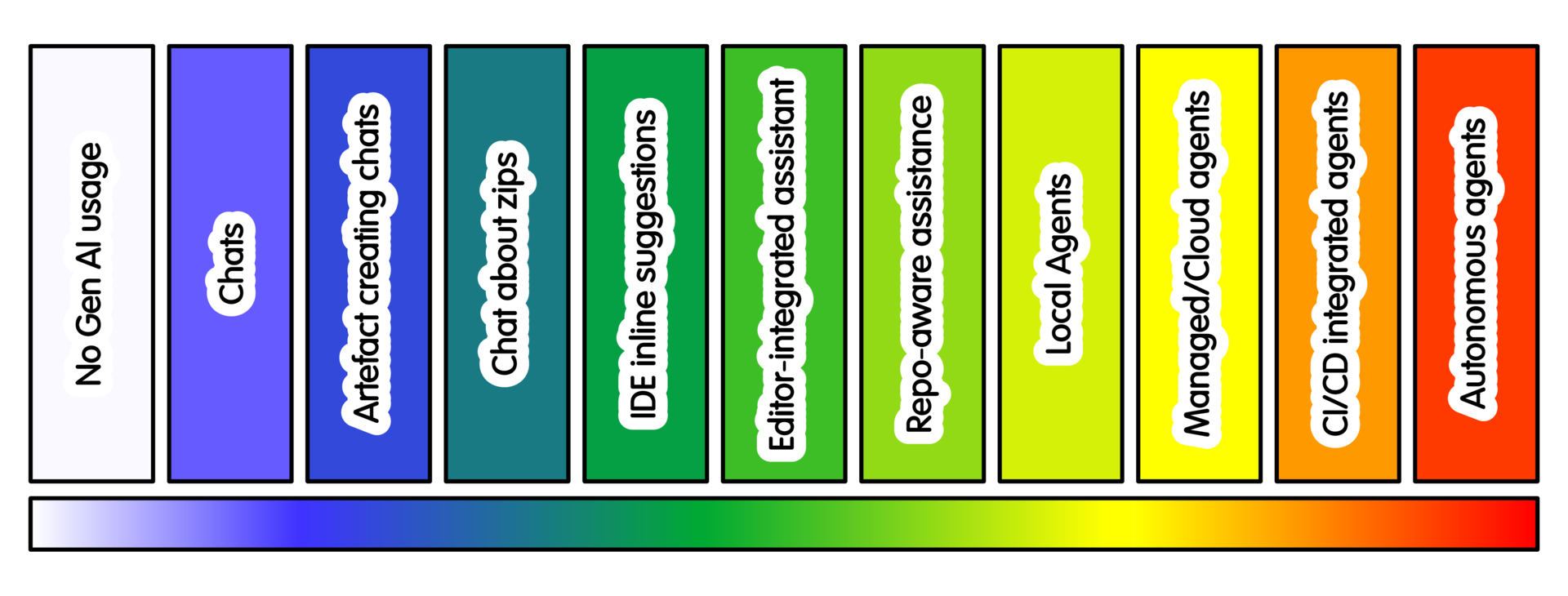
The AI Spectrum helps you make a conscious choice. It shows when more or less intensive AI practice may fit.
There are many reasons to use different levels, or no AI. Start from the work, not the tool. Local policies may also favour lower intensity for ethical or environmental reasons.
Different practices offer different context, capability and autonomy. More intensive use is not inherently better. The right level depends on the task, review capacity, material sensitivity and safe access.
This page helps you decide whether to stay, move down or move up. These are not maturity levels or required steps. Conversation may suit one task, repository-aware or agentic approaches another. Sometimes no AI is right.
0 - No Gen-AI Usage
Work without generative AI assistance. This is not just the default: some tasks require it. Reasons include learning or assessment and sharing limits. Low review capacity or wider ethical concerns may also matter. It also applies where no AI policy is agreed.
This level is particularly suitable when:
- Skill development / craft honing
- The purpose is learning or assessment.
- Data or code cannot be shared safely.
- Review capacity is limited.
- Environmental or ethical concerns outweigh likely benefit.
- The project has not agreed how AI-assisted work should be handled.
If these do not apply, consider another level where it offers a clear benefit.
1 - Conversational Interaction
Use conversation for explanations, design trade-offs, unfamiliar errors and conceptual help. Examples include: “Explain this compiler error” or “What should I test?” You might also ask what assumptions a numerical method makes.
Stay here while conversation improves your understanding.
Move up when understanding reveals a useful small artefact. It should still be easy to review.
Move down or stop when conversation starts replacing reading, debugging, testing or domain understanding. Conversational use should build understanding, not bypass it.
2 - Conversational artefact creation
This creates small, reviewable outputs in chat. Examples include a helper function, test skeleton, README paragraph or command-line example.
Stay here while the artefact remains easy to review. The conversation should also help improve it.
Consider lower intensity when:
- The artefact is no longer small enough to review.
- The tool invents APIs or assumptions.
- The person using the AI cannot explain the result.
Move up when the task needs selected project context, provided those files can be shared safely.
A useful rule is to keep generated artefacts within your review capacity. For some research tasks, this may be the sweet spot.
3 - Conversational Creation with Zip Files
This adds selected files, snippets, logs or zip files for context. Examples include: “Suggest tests for these files”, “Review this package structure”, or “Explain why this example fails.”
Stay here when selected context is enough. The result should still be easy to review.
Move down when:
- Uploading context creates confidentiality, licensing, provenance or environmental concerns.
- The model becomes more confident than the evidence allows.
Move up when repeatedly describing and editing files becomes the main burden. The files must still be safe to share.
More context can improve answers. It also increases exposure and the risk of misplaced confidence.
4 - IDE autocomplete and inline suggestions
Here AI moves into the local editor and suggests code as you work. Examples include boilerplate, repetitive tests or docstrings.
Stay here while suggestions help and you understand each one you accept.
Move down when suggestions start moving faster than your understanding. This often matters while learning, debugging carefully or working through unfamiliar code. Switch suggestions off or return to conversation.
You can also change interaction mode. Instead of accepting a completion, ask a chat tool to explain it. It can list assumptions or suggest tests.
Move up when inline suggestions are too local. This may happen with larger edits or changes across files. Documentation work or wider project structure may also need more.
Do not move up because the tool offers more power. Move only when the task needs it and you can still review the result.
5 - Editor-integrated local assistant
The assistant can make substantial editor changes. Examples include refactoring a function, adding type hints, generating tests or updating docstrings.
Stay here when changes remain small, local and reviewable as one coherent patch. This works well for tests, docstrings, one function or a few related files.
Move down when:
- Changes arrive faster than you can review them.
- The work becomes mainly learning, debugging or understanding.
Conversation or autocomplete may then be more appropriate.
Move up when the task genuinely depends on wider project structure. This might include call paths, configuration, tests, documentation or packaging. Behaviour may also span several files.
Broader context raises intensity. It is useful only while you can still review the result. Repository-aware assistance may then fit better.
Do not increase intensity simply because the tool allows it. Judgement matters more than speed, especially when changes affect the research.
6 - Repository-aware assistance
AI can now search and reason across the whole project. It might trace a setting, find feature tests or suggest where a new option belongs.
Stay here when repository search and explanation are enough. It is useful for orientation, call paths, test locations, configuration and documentation gaps.
Move down when:
- One file, one snippet or a short conversation is enough.
- The repository contains material the tool should not see.
Move up when the task truly needs edit-run-fix cycles. That usually means tests or checks can guide the work. The tool also needs a safe local checkout.
Repository awareness helps navigation. It does not replace project judgement or understanding.
7 - Constrained local tool-using agents
Here the local tool becomes an agent. It can edit files, run commands and loop under supervision. Examples include fixing a failing test, running linting or preparing a patch without pushing.
Stay here when supervised local action solves a real problem. This works best with a reproducible setup and useful tests. The task must still be small enough to review.
Move down when:
- Repository-aware explanation is enough.
- The task is mainly learning, debugging or understanding.
- The project cannot provide a clean setup.
- Tests are weak.
- The agent wants unfamiliar commands.
- Review takes longer than doing the work directly.
Move up when local supervised work is not enough. Isolated parallel work or clean remote environments may help. Asynchronous execution may also solve a real bottleneck.
Do not increase intensity because the agent can do more. Increase it only when the project can govern the added access. Cost and review burden must also remain manageable.
8 - Managed or cloud coding agents
These agents can use network services, such as GitHub, or run remotely. A hosted agent often works asynchronously. It might implement an issue, run tests and prepare a branch or PR.
Use this level when remote execution helps. The project must still control the result.
Stay here when managed execution solves a real project problem. It may avoid setup issues, run checks cleanly or test several approaches without disrupting local work.
Move down when:
- A local assistant, repository-aware tool or separate checkout is enough.
- Cloud execution exposes private context or uses shared resources without clear benefit.
- Review burden rises without maintainable value.
- Activity increases without useful outcomes.
Move up only when the project can govern the extra access. That means clear permissions, contribution rules and review capacity. It also means CI protections and separation from normal team development.
9 - CI/PR/repository agents
Here agents become part of shared project workflows. Examples include PR review, CI fixes, issue triage, dependency updates or an AI staging repository. This goes well beyond deterministic CI/CD pipelines (which should also be used where appropriate).
Stay here when repository automation provides a clear workflow benefit. It may help with PR summaries, review checklists and CI diagnosis. Release notes or maintenance triage may also benefit.
Open-ended autonomy needs its own justification. Repository activity is not the same as project progress.
Move down when:
- Templates, documentation, CI, scripts, scheduled jobs or staged automation can provide the same benefit.
- Automation hides team discussion, increases review burden, weakens provenance, or creates activity without maintainable value.
Use more AI only through a separate governance decision. Base that decision on known needs and benefits.
Broader automation may make sense with explicit ownership and review capacity. Rate limits and restricted permissions also matter. Keep automation separate and make rollback possible.
10 - Open-ended autonomous agents
These are broad tool-using systems with persistence, scheduling or external integrations. They may act across repositories, services, email or cloud resources.
A concrete example is an agent that tracks new releases and CVEs. It watches tools and libraries you use. It could test whether updates affect your project. It could then update code or libraries and prepare PRs for review.
Stay here only when broad autonomy serves a clear, governed need. The project must be able to observe, limit, stop and audit the system.
Use less AI, or remove authority, when an agent produces broad diffs or cannot explain changes. Do the same if it alters tests to fit implementation, needs excessive review, follows untrusted instructions, or acts outside the task boundary.
At this level, the answer is often not a better prompt. It may mean less authority, less context or fewer tools. Stronger permissions, or no AI, may be better.
Summary
Choose the AI practice that fits the task, not the most capable tool available.
Higher intensity can add context, automation and ability to act. It can also increase exposure, resource use, review burden and the cost of mistakes. It may also increase environmental cost. A reasonable policy may be: “use the lowest intensity you can justify”.
Move up when greater intensity solves a real problem. Extra context, access and authority must still be governed safely. Move down when a simpler practice provides the same benefit. Also move down when review cannot keep pace, or added access and automation are not justified.
The right point on the spectrum can vary between tasks in the same project. Moving down is a legitimate engineering decision. So is changing interaction mode or choosing no generative AI.
Training

Michael Sparks
The University of Manchester / Software Sustainability Institute
Caterina Doglioni, Michael Sparks, "AI Intensity Considerations". everse.software. http://everse.software/RSQKit/ai_intensity_considerations .