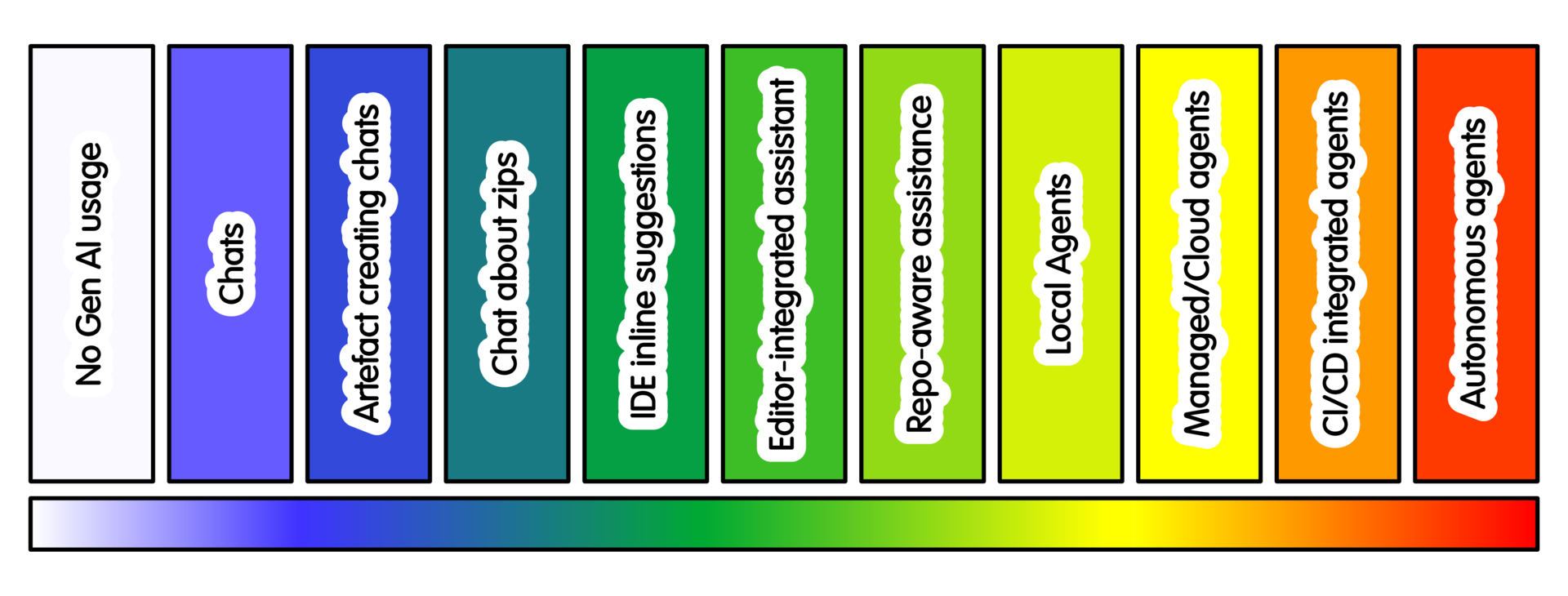
Use cases across the AI spectrum
Introduction
These usecases cover a wide range of examples, and aim to illustrate specific scenarios starting from different points in the spectrum. For example, “plan, specify and design” starts from the lower end of the spectrum, but similar work at higher ends would use greater levels of strong specification/testing - as per the cross cutting practice
As usual, start with what you are trying to achieve. Then choose the least intensive AI practice that helps. Preserve research correctness, guardrails, rollback and reproducibility.
The same task can take several forms. A short conversation can clarify a problem. Selected files add useful context. Repository-aware assistance helps when work spans a project. An agent earns its place when running tools and iterating actually saves effort.
These examples start from common research-software work, not tools. Each shows where to begin, why more intensity may help, and when it will not.
1 Plan, specify or design something
Before writing software, understand what the research requires. Decide what the software should do. Identify constraints and choose an appropriate design. This may include requirements, architecture, tools and infrastructure. It also includes how research and software concerns fit together.
Worked example: designing a small piece of research software
Begin with Conversational Interaction. Describe the research problem and known constraints. Explain what the software must support and who will use or maintain it. Ask the AI to identify assumptions, missing requirements and trade-offs. Do not ask it to produce code yet.
Where existing material matters, Conversational Creation with Zip Files can provide selected documents, interfaces or data. For an existing project, Repository-aware assistance can trace interfaces, dependencies and conventions before suggesting where the work belongs.
Do not increase AI intensity just to implement uncertainty faster. If requirements or design choices remain unclear, automation will not resolve them. Return to the people who understand those constraints.
2 Understand, investigate or evaluate something
Sometimes the work is mainly about understanding. That may mean unfamiliar code, an unexpected result, an error or a scientific assumption. It can also mean debugging, tracing behaviour or interpreting feedback.
Worked example: diagnosing a failing analysis or test
Use Conversational Interaction to explain the failure and explore likely causes. Ask for hypotheses, missing information and useful checks, not a fix. The aim is understanding the problem first.
Bring in Conversational Creation with Zip Files when logs, examples or files provide needed evidence. If behaviour spans the project, Repository-aware assistance can locate tests, call paths, configuration and assumptions. A Constrained local tool-using agent helps once investigation needs repeated tests or experiments.
Reduce intensity if the AI changes code before the failure is understood. The same applies if it rewrites tests to fit the implementation. The purpose of debugging isn’t to make the error disappear.
3 Create or modify software
This includes new behaviour, refactoring and adapting software for research. The right assistance depends on change size, project context and reviewability.
Worked example: adding a small feature
For a small change, Conversational artefact creation, IDE autocomplete and inline suggestions, or an Editor-integrated local assistant is often enough. Define the intended behaviour yourself. Include important inputs, outputs and constraints. Ask for a small, reviewable change.
When behaviour spans several files, Repository-aware assistance can show where the change belongs and what else it affects. A Constrained local tool-using agent helps when the task becomes a short edit-run-test cycle.
More capability is not automatically better. If review is harder than making the change directly, reduce the intensity. Do the same if unrelated code starts changing. Clear specification and human judgement still matter.
4 Check correctness and quality
Research software quality goes beyond passing tests. Software must behave correctly for the research. It must respect scientific and numerical constraints. It must also avoid failures that silently invalidate results.
Worked example: testing software against scientific constraints
First identify properties that should always hold. These may be software rules or scientific invariants. A state that cannot physically return once exhausted should not “come back to life”. Energy in a closed system should not exceed what the model permits. Mutually exclusive probabilities should not sum above one.
Tests can also capture numerical behaviour. An implementation may need explicit error bounds. It may calculate in log space to avoid underflow and lost precision. Conversational Interaction can help identify properties, edge cases and failure modes before tests are written.
Conversational Creation with Zip Files can relate constraints to selected implementation files. Repository-aware assistance can trace where assumptions enter the software and which tests exercise them. An Editor-integrated local assistant or Constrained local tool-using agent can then implement tests, run them and investigate failures.
Passing an AI-generated test suite is not evidence that the science is correct. Reduce intensity if the AI invents constraints or weakens tests to fit the implementation. Scientific correctness must stay anchored in the research.
5 Document, package, release or publish
Software must also be understandable, usable and shareable. That can mean documentation, CodeMeta, packaging and a persistent identifier. It may then be released, deployed, archived or published.
Worked example: packaging software
If you understand the packaging approach, Conversational artefact creation may be enough for metadata or configuration. If the system is unfamiliar, start with Conversational Interaction. Ask what the files mean, what information is required, and what assumptions the configuration makes.
Use Conversational Creation with Zip Files when layout, dependencies or entry points matter. Repository-aware assistance helps when packaging spans source layout, tests, documentation, build configuration and automation. A Constrained local tool-using agent can help once the task becomes build-check-fix.
Packaging rarely needs broad autonomy. If the tool alters unrelated dependencies or release processes merely to make the build pass, reduce intensity. Review the real problem instead.
6 Preserve or reproduce work
Research software often must survive changes to its environment. Reproducible environments, containers, provenance, archiving and persistent metadata help others reconstruct what was run and why. They also help your future self.
Worked example: creating a reproducible software environment
Document what the environment actually needs. Include runtimes, dependencies, operating-system assumptions, tools, data and configuration. Conversational Interaction can help separate essential dependencies from incidental details of a developer’s machine.
Environment files, lock files, containers or CI can provide evidence through Conversational Creation with Zip Files. Repository-aware assistance can find undeclared dependencies or setup steps hidden in documentation and scripts. A Constrained local tool-using agent can build the environment in a clean checkout and report failures.
Automatically updating everything is not reproducibility. Nor is silently replacing missing components. If the environment no longer reproduces the original research conditions, the automation solved the wrong problem.
7 Maintain software and respond to change
Software keeps changing after release. Dependencies evolve, platforms disappear, bugs appear and research needs change. Maintenance means changing software and deciding what is justified.
Worked example: updating a dependency after a breaking release
Use Conversational Interaction or Repository-aware assistance to investigate what changed. Identify what software is affected and which tests or compatibility checks provide evidence. Repository context matters when the dependency appears in several places or its assumptions are distributed.
A Constrained local tool-using agent can try the dependency in an isolated checkout. It can then test it and prepare a patch. Managed or cloud coding agents help when clean environments, multiple versions or platform combinations matter.
Watch for maintenance becoming automatic churn. If an update brings no clear benefit, keeping the existing dependency may be better. The same applies when it introduces unexplained behaviour.
8 Automate repeated or ongoing work
Some work matters because it repeats: tests, builds, releases, dependency checks and routine maintenance. Automation ranges from ordinary CI to repository agents and persistent systems that react to external changes.
Worked example: automating tests with CI
Start with conventional automation. Define the tests and make them reproducible locally. Then configure CI to run them consistently. Conversational Interaction or Conversational artefact creation can explain CI or draft a workflow. The commands should still be understandable and runnable without AI.
Repository-aware assistance can explain CI or find duplicated and missing checks. CI/PR/repository agents help with failure diagnosis, summaries, complex test matrices or candidate fixes.
For recurring work, Open-ended autonomous agents fit tasks that must watch an external condition and react. An agent might monitor dependency releases and CVEs. It could check whether a project is affected, test an update, and prepare a PR.
Reserve agents for problems scripts, CI or scheduled jobs do not already solve. If automation creates activity without useful outcomes, or obscures ownership, simplify it.
9 Hone the skills needed to evaluate AI-assisted work
Using AI well depends on judging what it produces. That judgement does not appear automatically as intensity rises. Developers still need to understand code, tests, architecture, scientific constraints, debugging and project context. Without that, plausible, incomplete or wrong answers are harder to spot.
Bluntly: Manual practice is part of the evaluation infrastructure for AI-assisted practice.
Practising those skills is not merely a fallback. It helps maintain the ability to use higher-intensity AI responsibly.
Worked example: practising the manual equivalent of a higher-intensity task
For work normally done with Repository-aware assistance or a Constrained local tool-using agent, deliberately do an equivalent task using No Gen-AI Usage. Write the code yourself. Trace it, identify tests, form a hypothesis, make the change and evaluate it. The point is to retain the skills needed to judge the AI-assisted process.
Evaluation must also change as tasks grow. Reading every generated line works for a small artefact, but not repository-wide or agentic work. At higher intensities, evaluation relies more on independent tests, invariants and reproducible checks. It can also use targeted review or adversarial agents.
These approaches reduce review burden. They still require expertise to design good checks and recognise weak evidence.
Higher-intensity evaluation cannot replace the underlying skills. If you can no longer reason confidently about a representative lower-intensity version, it becomes hard to tell whether automation helps or merely looks convincing.
Summary
Different work justifies different AI assistance. The right choice changes as work progresses. A task may begin with Conversational Interaction, move into Repository-aware assistance or agentic work, then return to lower intensity when understanding or judgement matters more.
Start from the work, not the tool. Increase intensity when more context or automation solves a real problem. Reduce it when simpler methods work, or when review and understanding cannot keep pace.
Whatever level you use, preserve what matters most: research correctness, effective guardrails, rollback and reproducibility. And remember that manual practice is the core skill for evaluating AI-assisted practice. Maintaining the skills to understand, test and challenge the work makes higher-intensity assistance usable responsibly.
Training

Hugo Bacard
CNRS

Michael Sparks
The University of Manchester / Software Sustainability Institute
Hugo Bacard, Michael Sparks, "Usecases across the spectrum". everse.software. http://everse.software/RSQKit/ai_usecases_across_the_spectrum .