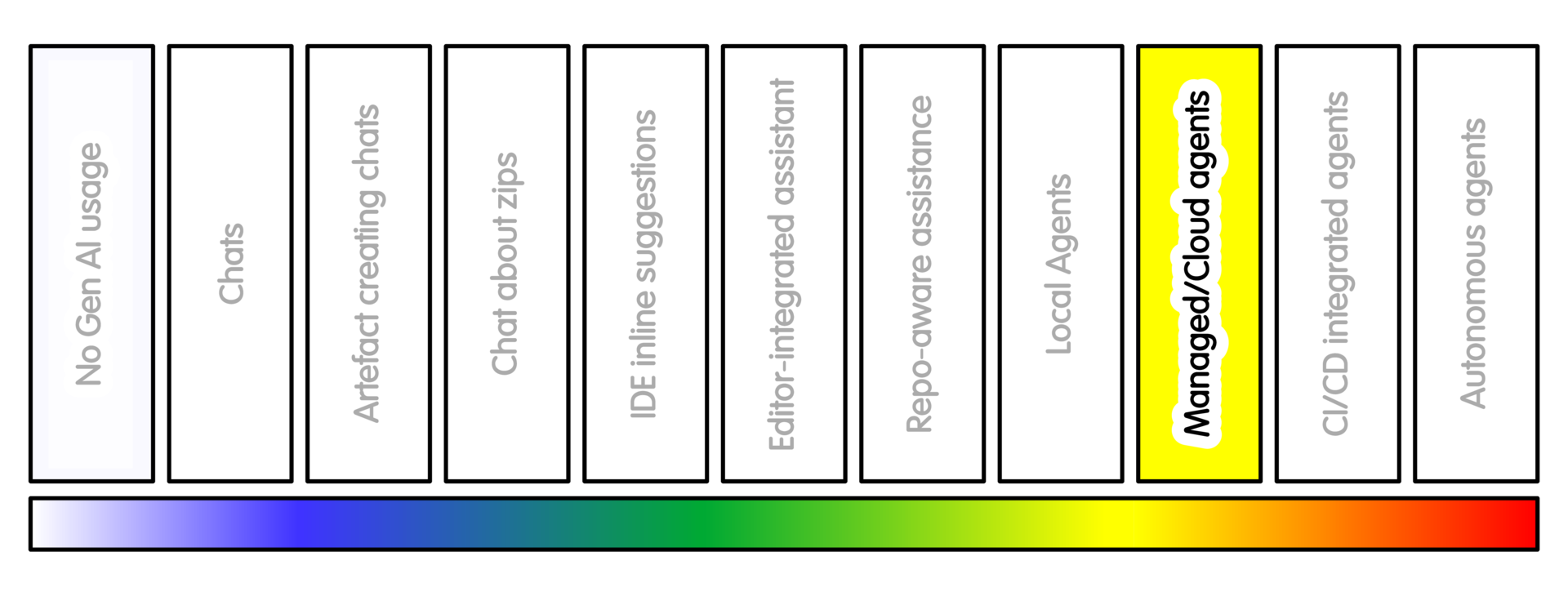
Overview
Managed coding agents run outside your local editor, usually in a hosted or configured environment. They may clone a repository, work in an isolated branch or worktree, run tests, and prepare a change for review.
This can be useful for routine issues, documentation updates, test additions, small refactors, dependency chores, or parallel investigation of several candidate approaches.
Examples include Codex web/cloud, GitHub Copilot coding agent, Google Jules, Devin, Replit Agent and similar hosted coding agents.
This is different from local editor assistance because the work may happen outside your machine. This can reduce time to setup, but it also changes the risk.
The repository, configuration, logs and sometimes other project context may be processed by an external or centrally managed service. This makes remote execution a governance boundary, not just a more convenient development environment.
Getting Started
For a concrete first example, let’s assume a GitHub repository using a GitHub-hosted coding agent such as GitHub Copilot coding agent. There are many other systems that match the concept of managed or cloud coding agents, but this has been chosen to avoid being too abstract.
Good practice would be to have the agent operate on a clone of the repository you want to work with, rather than the main project repository. (In the same way you would have external contributors make local changes and suggest PRs)
Do not start with an important private analysis pipeline. Start with a low-risk repository.
Good first choices include:
- A public test repository
- A fork of a non-sensitive repository
- A private test repository containing no sensitive material
- A small documentation-only project
- A toy package created to evaluate the workflow
Before enabling or assigning the agent, check the repository.
In particular, you should do this on a repository you own.
Additionally you should check whether:
- The code is public or private
- Unpublished research is included
- Sensitive data may be present
- The repository contains secrets or private URLs
Additionally you should check whether the agent can:
- Create branches or pull requests
- Trigger CI
- Use paid or shared compute resources
Lastly, you should confirm your project or institution allows use of AI with this repository in this way.
Add basic project guidance before asking the agent to work.
For GitHub Copilot, this might include repository custom instructions such as
.github/copilot-instructions.md. For other systems, this might be an AGENTS.md file.
That guidance should include:
- How to install the project
- How to run tests
- How to build documentation
- Hhat files are in scope
- What files are out of scope
- Whether new dependencies are allowed
- Whether pull requests may be created
- What counts as a successful result
If the agent needs extra setup, use the project mechanism for this.
For GitHub Copilot, this may include a copilot-setup-steps.yml workflow.
For the first task, use an issue with a narrow goal.
A reasonable first issue might be:
- “Update the tutorial so that it matches the current command-line interface. Do not change implementation code. Do not add dependencies. Run the documentation checks. Report what changed, what passed, and what was not checked.”
Assign the issue to the coding agent only after the issue is clear.
For the first few runs, prefer tasks where the expected result is easy to inspect:
- Documentation updates
- Additional tests for a public bug
- Broken example fixes
- Simple CI failure diagnosis
- Dependency investigation without applying the upgrade
Avoid tasks involving:
- Private data
- Unpublished results
- Production systems
- Release configuration
- Deployment
- Package publishing
- Authentication
- Scientific algorithm changes
- Clinical, safety-critical or dual-use behaviour
After the agent runs, review the branch or pull request as candidate work.
Checks you should make include:
- Files changed
- Which tests or checks were run, and which if any failed
- What was not checked
- Assumptions that were made
- Whether CI was triggered, and the outcome of this
- What credentials, services or paid resources were used (if any)
Do not treat a branch or pull request as accepted simply because the agent created it. Promote only work that a responsible person has reviewed, understood and accepted.
Review AI-generated contributions as critically as you would review work from outside the project team. The issue is not bad intent; it is that plausible, familiar-looking work may still be wrong In this case, familiarity does not imply correctness.
Sample Appropriate Practice
Some sample prompts at this stage might look like this. Bear in mind at this stage the examples describe the high level concepts. The examples here are larger and more ambitious that other practices in the spectrum with lower levels of AI intensity usage. For these to be actually good prompts would require a significant amount of extra good quality context.
-
“Add regression tests for this public bug report and prepare a candidate patch.”
-
“Update this tutorial to match the current command-line interface. Run the documentation checks.”
-
“Investigate whether dependency X can be upgraded. Report failing tests and likely breaking changes before editing.”
-
“Prepare a candidate branch for this documentation issue. Do not change implementation code.”
Concerns/Risks
Managed agents can make multiple plausible changes quickly. That is useful for routine engineering work, but risky for scientific code where correctness depends on domain assumptions.
Require explicit domain review for changes to analysis logic, preprocessing, model evaluation, numerical methods, units, thresholds or data interpretation.
The risk is not only that the agent writes bad code. It may receive too much repository access, expose private project structure, run in an environment that differs from yours, create branches or pull requests that someone then has to review.
It may use compute or paid resources without clear benefit.
In private or collaborative research, connecting the wrong repository can be a governance problem as well as a software problem.
Quality Practice
Treat the agent output as candidate work.
Review it as critically as work from outside the project team. The issue is that plausible, familiar-looking work may still be wrong.
Start from the original task or issue and check that this was done. Do not let a useful-looking branch redefine the task after the fact.
Ask the agent to summarise:
- What it changed and why
- which tests or checks it ran and what failed
- What it did not verify and what assumptions it made
- What files, services or systems it accessed
- Whether it used paid or shared compute resources
Then confirm this is true - check the branch or pull request yourself.
In particular, check whether:
- Only expected files changed or implementation code changed unexpectedly
- Dependencies or lock files changed or CI, packaging or release files changed
- Documentation matches actual behaviour and tests check the requirement, not just the generated implementation
- Whether scientific assumptions, units, thresholds or data handling changed. The larger the change, the harder this can be.
The key point is to review actions as well as outputs. Not just the patch that was produced but also what the agent read, changed, ran, accessed or triggered.
Make sure the environment has no unnecessary secrets. Avoid giving cloud agents access to sensitive data, private submodules, deployment credentials or broad organisation permissions.
If the agent can create a pull request, consider whether that is desirable. It may be better for the agent to prepare a branch, patch or report for a responsible person to promote.
A branch prepared by an agent is not an accepted contribution. A pull request created by an agent is not an accepted contribution. It is candidate work.
Only promote work that someone responsible for the project understands, accepts, and can explain.
AI Intensity Considerations
Use this level when remote execution helps, and when the project can still control the result.
Stay at this level when remote or managed execution solves a real project problem. For example, it may reduce setup problems, run checks in a clean environment, or allow several candidate approaches to be explored without disrupting local work.
Reasons to consider downgrading AI intensity usage may include:
- When a local editor assistant, repository-aware tool, or separate local checkout is enough.
- When cloud execution exposes private context or increases review burden uses shared resources without clear benefit
- When activity increases without maintainable value.
By contrast you may only want to increase AI intensity levels when the project can govern the extra access it grants. That means clear permissions, contribution rules, review capacity, CI protections, and separation between automation work and team development flow.
Training

Michael Sparks
The University of Manchester / Software Sustainability Institute
Michael Sparks, "Managed or cloud coding agents (intensity 8)". everse.software. http://everse.software/RSQKit/managed_or_cloud_coding_agents .