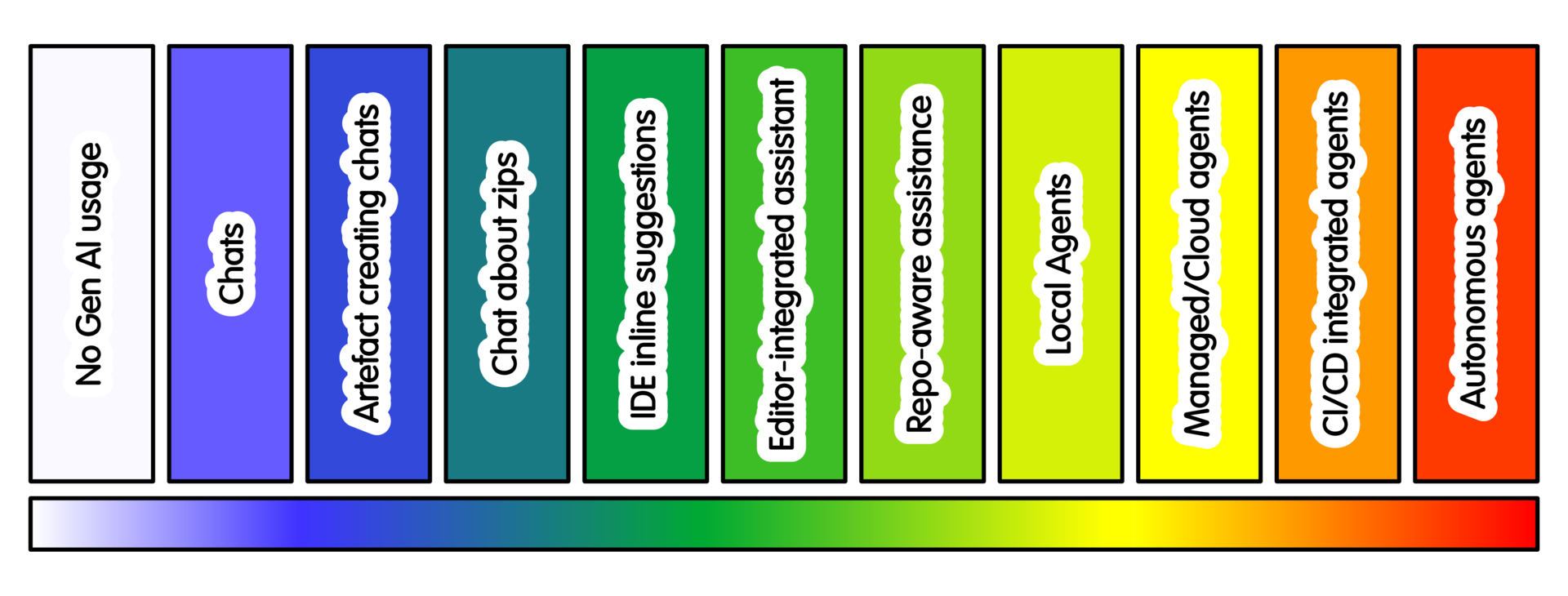
Spectrum of Intensity of AI Usage
Overview
The spectrum below describes AI usage practices by intensity. What does this mean? It essentially equates to how much autonomy the AI tooling has relative to your control. The more autonomous the AI usage, the higher the intensity - since it can operate faster and for longer without your intervention. In some cases this may equate with higher costs. It often equates with higher risk because more can happen without your intervention. That means if more goes wrong for any reason, the more intense the clean up operation…
The numbering is for convenience. Higher numbers imply more intense AI use. They do not imply better practice, greater maturity or better quality.
A whiteboard on the door of a shared space may be the simplest way to book use of that space. It may also be the optimal mechanism.
The same applies here. Use the practice that fits the work.
-
0. No GenAI usage - Work undertaken without generative AI assistance. This is included, not just because it’s the default but because it can be necessary due the nature of the task. Reasons include: learning or assessment goals, restrictions on sharing information, limited review capacity, or wider ethical and environmental considerations. It also applies to projects that have not agreed a policy.
-
1. Conversational interaction - Conversations asking for explanations, background, design trade-offs, unfamiliar errors and conceptual help. Examples: “Explain this compiler error”, “What should I test?”, “What assumptions does this numerical method make?”, “What misunderstandings might the average developer have based on this code?” (for sanity checking API design)
-
2. Conversational artefact creation - Chat-based creation of small, reviewable outputs. Examples: a helper function, a test skeleton, a README paragraph, a regular expression, or a command-line usage example.
-
3. Conversational Creation with Zip Files (etc) - Providing selected files, snippets, logs or zip files so the tool can reason about the content. Examples: “Suggest tests for these files”, “Review this small package structure”, “Explain why this minimal example fails.”
-
4. IDE autocomplete and inline suggestions - AI suggestions appear while editing. Examples: completing boilerplate, filling repetitive test cases, suggesting docstrings or small local code patterns.
-
5. Editor-integrated local assistant - The assistant can make bounded edits inside the editor. Examples: refactor a function, add type hints, generate tests for a module, update these docstrings.
-
6. Repository-aware assistance - The tool can search and reason across the repository. Examples: trace where a setting is used, identify tests for a feature, propose where to add a new option.
-
7. Constrained local tool-using agents - An agent can edit files, run commands and iterate locally under supervision. Examples: fix a failing test on a disposable checkout, run linting, prepare a patch without pushing.
-
8. Managed or cloud coding agents - A hosted or managed agent works in a configured environment, often asynchronously. Examples: ask a cloud coding agent to implement a small issue, run tests, and prepare a branch or PR for review.
-
9. CI/PR/repository agents - Agents are integrated into shared project workflows. Examples: review PRs, suggest CI fixes, triage issues, draft dependency updates, or maintain an AI staging repository.
-
10. Open-ended autonomous agents - Broad tool-using systems with persistence, scheduling or external integrations. Examples: agents that can act across repositories, services, email, cloud resources or multiple tools over time.
Practices
 tasks ai
Considerations for no GenAI usage, especially in a GenAI world
tasks ai
Chats regarding explanations, trade-offs, errors and conceptual help
tasks ai
Chat-based creation of small, reviewable outputs
tasks ai
Providing selected files, snippets, or zip files to discuss, use and improve
tasks ai
AI suggestions appear in your editor, while editing
tasks ai
The assistant can make bounded edits inside the editor
tasks ai
An agent can search and reason across the repository
tasks ai
An agent can edit files, run commands and iterate locally under supervision.
tasks ai
A hosted or managed agent working asynchronously in remote environment
tasks ai
Agents are integrated into repository workflows. Can triage bugs, review and create PRs
tasks ai
Broad tool-using systems with persistence, scheduling or external integrations
Training

Michael Sparks
The University of Manchester / Software Sustainability Institute
Michael Sparks, "Spectrum of Intensity of AI Usage". everse.software. http://everse.software/RSQKit/spectrum_of_intensity_of_ai_usage .