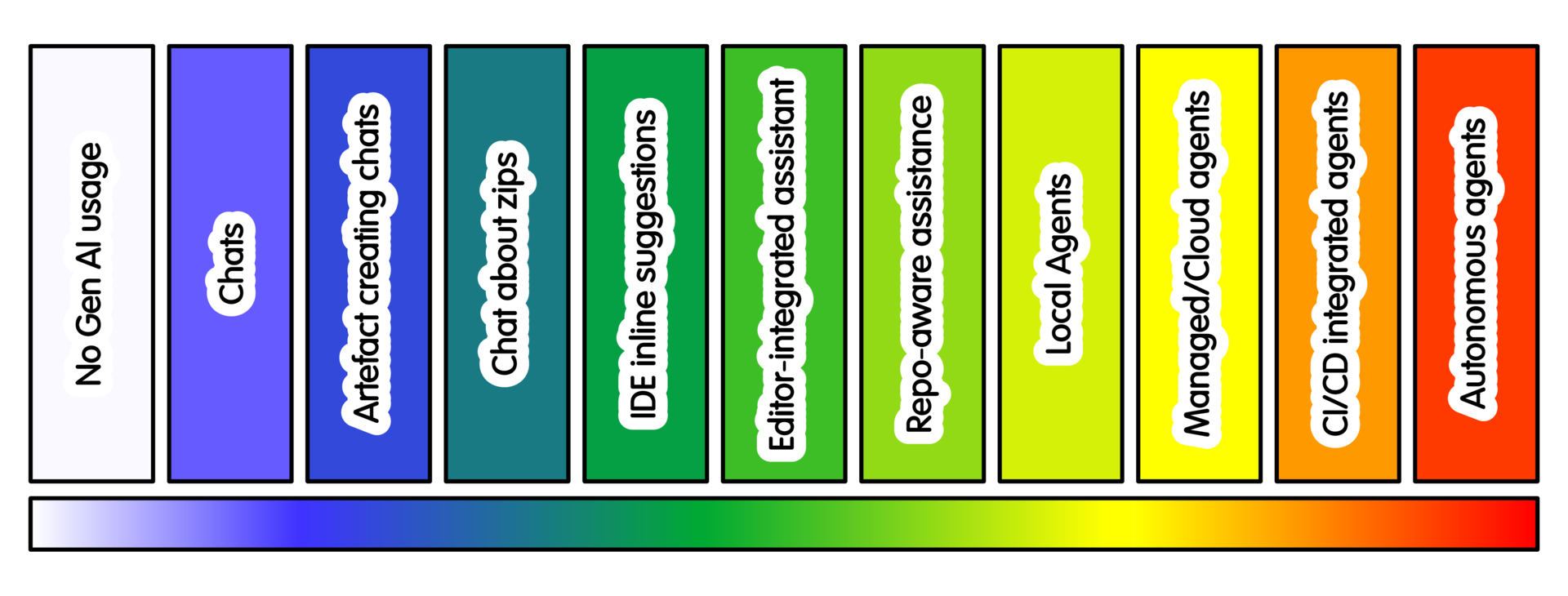
Examples of tools and mechanisms
Where tool names are included in this document, they are examples, not recommendations
They are included because otherwise the spectrum is too abstract to be useful. Due to rapid change in this area, the tools will likely change.
Talking about version control without mentioning git, GitHub or GitLab would be odd. The same applies here: it’s important to be clear what sorts of tools and mechanisms are being referred to.
Despite shorthand, a product name is not the same thing as a practice. The same tool may be used as a chat system, an autocomplete tool, repository-aware assistant, local agent, or cloud workflow depending on configuration. Similar tools may have very different levels of context, authority and autonomy.
Features, licensing, data-handling terms, institutional approval and availability all change. These examples make the discussion concrete, but should not be read as endorsement.
Where project data, private repositories, sensitive data or credentials are involved, use only tools approved for that context. If in doubt, use a lower intensity practice and discuss with other people before giving a tool access. This may include an RSE, data steward, information security colleague or maintainer.
| Spectrum area | Examples and mechanisms |
|---|---|
| Chat and explanation | ChatGPT, Claude, Gemini, Microsoft Copilot, institutionally provided chat tools |
| File or context chat | ChatGPT file upload, Claude file upload, Claude Projects, selected zip files, minimal reproducible examples, pasted logs, pasted git diff output |
| IDE autocomplete | GitHub Copilot, Gemini Code Assist, Cursor, Continue, JetBrains AI Assistant, editor-specific plugins |
| Editor and repository assistance | GitHub Copilot Chat/Edits in VS Code, Cursor, Codex in an IDE, Continue, Cline, Zoo Code, JetBrains AI Assistant |
| Local tool-using agents | Claude Code, Codex CLI, Aider, Cline, Zoo Code, Gemini CLI and similar terminal or editor agents |
| Project instructions and extensions | AGENTS.md, .github/copilot-instructions.md, CLAUDE.md, Cursor Rules, SKILL.md-style skill folders, MCP servers |
| Managed or cloud coding agents | Codex web/cloud, GitHub Copilot coding agent, Google Jules, Devin, Replit Agent and similar hosted coding agents |
| PR, CI and repository agents | GitHub Copilot pull request summaries or review, GitLab Duo merge request support, Gemini Code Assist pull request review, repository bots, dependency-update automation, AI staging repositories |
The most important question is not simply “which tool is this?”.
The important question is:
- What can this tool see?
- What can this tool change?
- What can this tool trigger?
- What resources can this tool use?
- What happens if it is wrong?
- What prevents harm before a person notices?
- How large can the blast radius be if you get this wrong?
High-level comparison: Claude Code, OpenAI Codex and Ollama-based approaches
The tool landscape changes quickly, so this comparison should be treated as a way to think about classes of tool rather than as a permanent product ranking. The important differences are where the model runs, how much repository context it can access, what tools it can call, how permissions are managed, and how easy it is to create a reproducible reviewable workflow.
| Approach | Typical shape | Strengths | Main cautions |
|---|---|---|---|
| Claude Code-style terminal agents | Agentic coding tool in or near the developer terminal; can read a codebase, edit files, run commands and integrate with development workflows. | Good for local iterative work, debugging, documentation, tests and repository navigation where a developer can supervise commands and diffs. | Powerful because it can act. Use sandboxes, command approval, restricted credentials and clear “no push/deploy/delete” rules. Treat shell access as a major boundary. |
| OpenAI Codex-style managed/cloud agents | Coding agent working in a configured cloud environment or connected repository, often asynchronously and sometimes in parallel workspaces. | Good for isolated tasks, parallel candidate patches, routine issues, tests and documentation when the environment is well specified. | Repository permissions, cloud context and PR creation need governance. Provide setup docs and tests; avoid broad organisation access and sensitive data. |
| Ollama/local-model approaches | Local runtime for running models on local hardware, often combined with editor plugins, scripts or custom agent harnesses. | Useful where local control, experimentation, cost control or data locality matters. Can support private prototypes and custom workflows. | Local does not automatically mean safe or high quality. Smaller/local models may perform worse on complex code; custom harnesses need their own permission, logging and review design. |
In practice these approaches overlap. A terminal agent may call remote models. A cloud agent may work from a repository with local-style tests. An Ollama-based setup may be connected to an editor or agent framework. For research software, the selection question is less “which is best?” and more “which mode gives enough help while keeping context, permissions, review and reproducibility under control?”
For cautious adoption, a sensible route is: conversational explanation; small generated artefacts; editor assistance on low-risk files; repository-aware read-only exploration; local agent in a disposable branch; then managed or CI-integrated agents only when project governance is ready. This is not a ladder. Stop at the least-automated pattern that gives genuine value, and step back when quality, learning, confidentiality, reviewer capacity, cost or environmental impact argue for less automation.
References and further reading
- Anthropic Claude Code documentation, “Claude Code overview” and “How Claude Code works”, code.claude.com/docs
- [OpenAI Codex documentation][CODE_PLATFORM] and product overview.
- Ollama documentation.
- Greg Wilson, “Twelve Ways to be Wrong about AI for Programming”, Third Bit, 20 May 2026.
- OWASP Top 10 for LLM Applications, especially risks around excessive agency and insecure tool use.
- NIST Secure Software Development Framework and AI Risk Management Framework for broader security and governance context.
- International Energy Agency, “Energy and AI” and 2026 updates on data centre electricity demand and onsite gas-based generation, iea.org.
- Research Software Engineers in the Age of GenAI: Same Value, Changing Practice. Stephan Druskat, Michelle Barker, Ian Cosden, Cunliang Geng, Robert Haines, Daniel S. Katz, Joseph Shingleton, Ben van Werkhoven https://www.researchsoft.org/blog/2026-05-28/
- Research Software Engineering in the Age of Generative AI: Building a Community Vision Barker, M., Katz, D. S., Hartley, K., Ahern, S., Chue Hong, N., Cosden, I., Daniels, R., Druskat, S., Dubey, A., Elmatad, Y., Geng, C., Gesing, S., Haines, R., Hetherington, J., Hodges, T., Howison, J., Kopec-Harding, K., Littauer, R., Maimone, C., … Yehudi, Y. (2026). Research Software Engineering in the Age of Generative AI: Building a Community Vision. Zenodo. https://doi.org/10.5281/zenodo.20320884
Training

Michael Sparks
The University of Manchester / Software Sustainability Institute
Michael Sparks, "Examples tools and mechanisms". everse.software. http://everse.software/RSQKit/example_tools_comparisons .